01
People and schedules
The manager recreated the team in the MailCalm application with individual email addresses, working days, working hours and routing availability.
MailCalm was developed around a genuine Microsoft 365 mailbox used by several people handling customer enquiries, replies, specialist requests and everyday business email. That source can be a formal Microsoft 365 shared mailbox or another Microsoft 365 mailbox used as a team inbox.
It is used every working day in the inbox it was originally built to improve. This page explains how it was introduced, how it behaved in live use, which problems were uncovered and what the working setup looks like now.
The team was not migrated into a new workspace. In this particular deployment, MailCalm runs on a Mac, while staff continue handling allocated messages in their existing inboxes. MailCalm is also supported on Windows 11. The point is the same on either platform: proper inbox routing without moving the team into another workspace.
The business is not named here, but the account below is based on genuine daily use rather than a demonstration environment.
The shared mailbox worked normally in Outlook, but it relied on staff noticing messages, deciding what to handle and remembering which conversations already belonged to them.
Existing alternatives felt broader than the problem because they introduced a larger shared-inbox or helpdesk system, rather than just adding routing, ownership and visibility around the inbox the team already used.
Several people worked from the same customer-facing Outlook team mailbox.
Incoming emails were manually noticed, picked up or forwarded by staff.
Work could be missed, duplicated or picked unevenly.
Some people naturally handled more new work than others.
It was not always immediately clear who owned a particular email.
Replies and returning customers could be handled by a different person from the original conversation.
Holiday cover and changing staff availability made manual allocation less reliable.
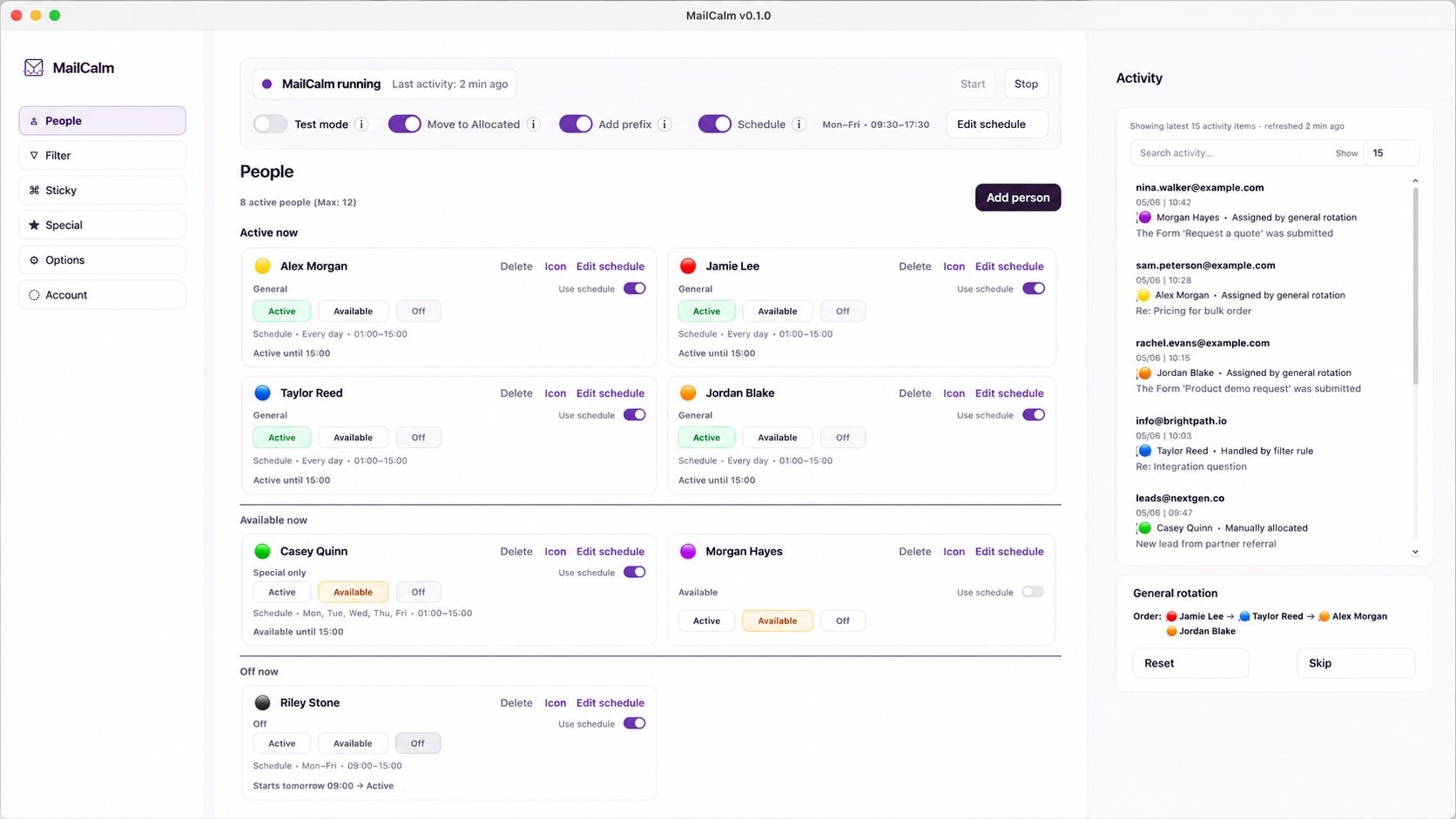
The manager recreated the team in the MailCalm application with individual email addresses, working days, working hours and routing availability.
Sticky ownership, specialist conditions, ignored senders and the general routing order were configured around the way the inbox actually operated.
MailCalm was first run in Test mode so messages could be evaluated without moving or forwarding live email.
Once the expected routes had been checked, Live mode was enabled and MailCalm began allocating real incoming messages by forwarding them to the selected recipients.
The live inbox contained far more than unrelated new enquiries. It included customer replies, existing conversations, specialist jobs, internal copies and messages arriving while different people were unavailable.
When no existing owner or specialist rule applied, new emails entered the general round robin and were forwarded to the selected eligible recipient.
Replies and returning customers stayed with the person who already owned the conversation where the ownership rules identified them.
Emails matching specialist senders, recipients, subjects or keywords were routed to the appropriate person instead of entering general rotation.
People who were Off, outside their working schedule or otherwise not eligible were left out of new allocations. In daily use, the manager could also make someone unavailable when they already had enough work, stopping new enquiries from reaching them without disrupting their existing customer conversations.
When an email reached the wrong person, it could be forwarded back to the Microsoft 365 mailbox used by the team and safely reallocated without immediately returning to the same person.
When the Allocated-folder option was enabled, the original remained in the Microsoft 365 mailbox and was moved to the Allocated folder, with a visible record of who received it.
When the Allocated-folder option was enabled, processed emails remained in the Microsoft 365 mailbox and were moved to the Allocated folder, with a visible record of the person who received them. Staff could work from their own Outlook inboxes while the team mailbox retained a visible history.
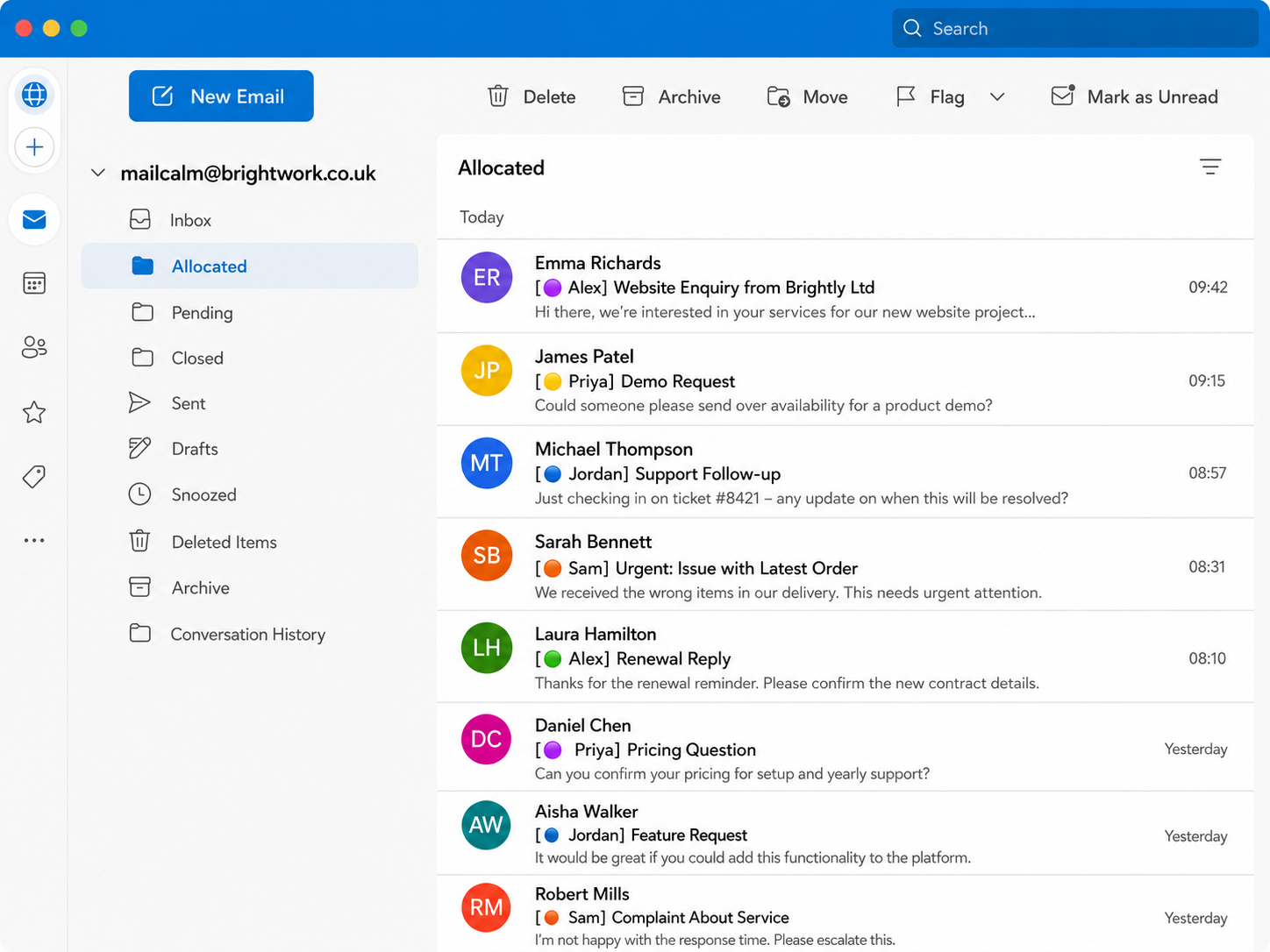
The point of using MailCalm in a real inbox was not simply to confirm that emails moved. It was to find out whether the routing remained correct through replies, schedule changes, different rule types and everyday Outlook behaviour.
During live use, a continuity issue was found where the next person in the general rotation could change unexpectedly after other routing activity.
The routing state was corrected so Sticky, Direct, Filter, Special and other non-round-robin decisions no longer disturb the stored general rotation.
A staff reply could be seen again by the router when the shared mailbox remained copied into the conversation.
MailCalm was changed to recognise and ignore those internal reply copies so ownership remained unchanged and the rotation did not advance.
Activity records did not appear correctly in one clean packaged installation because the log path differed from the development environment.
Activity logging was moved to the correct Application Support location and then retested on a clean macOS profile.
During the original Mac deployment, the same Microsoft 365 mailbox could potentially be configured on more than one computer, creating a risk of duplicate routing.
An active-router lock was introduced and tested so only one designated MailCalm routing computer can actively route a particular Microsoft 365 mailbox at a time.
Fixes were checked in source tests, packaged builds, clean macOS installations and live routing. Both Intel and Apple Silicon builds were also installed and validated through the normal customer download path.
MailCalm is now used every working day with the corrected routing behaviour in place.
MailCalm operates in the background around the existing shared mailbox. It does not become the place where staff read or reply to customer email.
Ordinary staff did not need MailCalm installed and did not need to log into MailCalm. The manager handled the routing configuration, and allocated messages were forwarded to the selected recipient. Another chosen inbox can be used where needed, but Outlook remains the normal daily example.
This account describes a Mac deployment. MailCalm currently supports Windows 11 (64-bit) and macOS 13 Ventura or later. The same rule-based routing approach applies on either supported platform, with the team staying in Outlook.
With Microsoft 365 access in place, a similar setup can usually be downloaded, configured, tested and running within a morning or afternoon.
The team continues working in Outlook.
Customers continue using the same team mailbox email address.
Staff receive their allocated messages in their normal Outlook inboxes.
Ordinary staff do not install MailCalm or log into MailCalm.
The Microsoft 365 mailbox keeps a visible allocation record when the Allocated-folder option is enabled.
In this deployment, the routing manager uses MailCalm on a Mac.
Activity is reviewed in MailCalm by the routing manager.
Schedules and availability can be adjusted without rebuilding the routing system.
Tell us how your team currently handles incoming email and we can explain how the same routing rules would apply to your setup.